
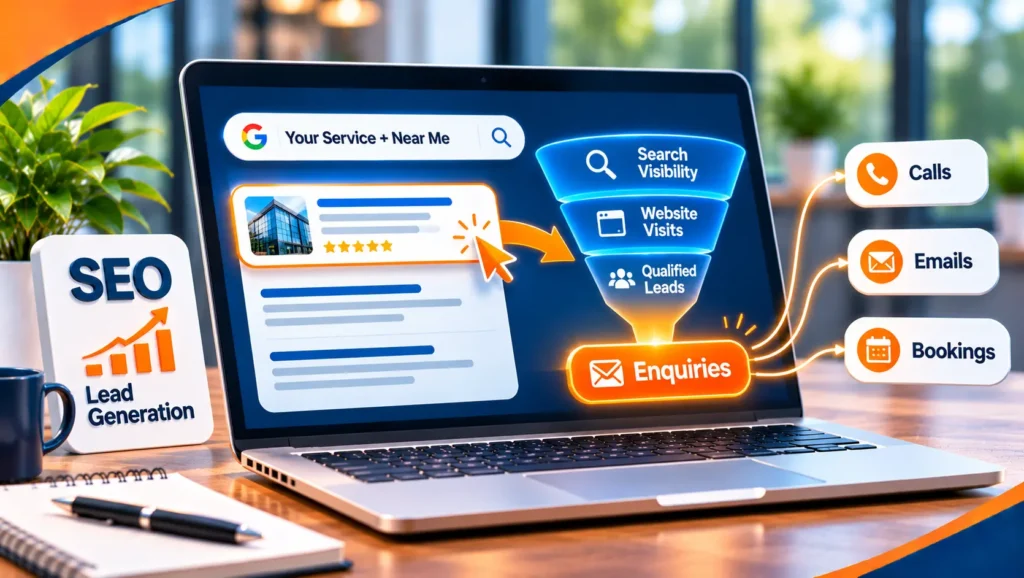
Lead generation SEO is the practice of using search to bring in people who are ready to enquire, book or buy, not just people who read a page. Ordinary SEO measures visits and rankings. Lead generation SEO measures the calls, forms and requests that come from search, and works backwards from there.
This guide explains how to find searches that lead to enquiries, build pages that convert, make it easy to get in touch, track what search really delivers and follow up well. It uses Google’s own documentation and does not quote benchmarks or conversion rates, because they vary too much between businesses to be useful.
To generate leads from SEO, choose searches that show buying intent, build a clear page for each, make the next step obvious and easy, track enquiries from search and answer them quickly. Google’s page on using Search Console and Google Analytics data for SEO explains that Search Console shows how your site performs in Google Search while Google Analytics shows how visitors interact with it, so you need both to see the path from a search to a lead.
Table of contents
- What lead generation SEO is
- Searches that bring leads
- Step 1: Define a lead
- Step 2: Find buying searches
- Step 3: Build pages that convert
- Step 4: Make enquiring easy
- Step 5: Attract and nurture with content
- Step 6: Local search and reputation
- Step 7: Keep the site fast and healthy
- Step 8: Track leads
- Step 9: Follow up fast
- Lead generation by type of business
- Tools you can use
- What it costs
- Rules to follow
- Common mistakes
- A worked example
- A 90 day plan
- Lead generation SEO FAQ
- Where to start
What lead generation SEO is
A lead is a person or business that has shown interest in what you sell and given you a way to respond, such as a phone call, a form, a booking or a message. Lead generation SEO aims to make search produce those people.
It differs from traffic SEO in what it values. A page that gets many visits but no enquiries is not doing the job. A page that gets few visits but several enquiries a month may be your best asset. The measure is what happens after the click.
Why search suits lead generation
People who search are usually looking for something right now. Someone who types “emergency plumber near me” or “accountant for small business” has a need and is ready to act. Search also keeps working after you publish a page, so a good service page can bring in enquiries month after month. It does take time, and it does not suit every business, as we explain below.
Searches that bring leads
Not every search leads to an enquiry. The type of search tells you what kind of page to build and what to ask for.
| Search type | Example | What the searcher wants | Page and next step |
|---|---|---|---|
| Ready to hire | commercial cleaning company in [town] | A provider who can do the job | A service page with a clear call or quote form |
| Comparing options | best accounting software for small business | A fair comparison | A guide with an honest recommendation and a link to talk |
| Checking the price | website design cost | A range and what affects it | A cost page with factors and a way to get a quote |
| Local need | dentist near me | Someone close and open | A profile and location page with phone and directions |
| Learning | how to choose a roofer | Information first | A guide that builds trust and leads to a service page |
| Comparing you | [your name] reviews | Proof that you are good | Reviews, case studies and clear contact details |
The first four usually produce leads most directly. The last two matter because people check them before they enquire.
Step 1: Define a lead
Before you change a page, decide what counts. Without a clear definition, you cannot tell good work from busy work.
- What action counts? A call, a form, a booking, a quote request or a chat. List them all.
- What makes a lead good? Ask your sales team or yourself which enquiries turn into customers. A good lead might be in your area, in your price range or asking for a service you sell.
- What is a lead worth? Estimate the value of a typical customer. It helps you decide how much effort a search is worth.
- Who follows up, and how fast? A lead that waits two days is often a lead lost.
Step 2: Find buying searches
You do not need an expensive tool to start. Use what you already have.
Start with your own words
List what you sell and the places you serve. Then list the words customers use when they call you, which are often different from yours. Our guide to SEO keywords explains how to turn the list into searches.
Read your Search Console data
Google’s Performance report shows the searches that already bring people to your site, with impressions, clicks and average position. Look for searches with buying intent where you appear on page two or three. Those are your quickest wins. Our guide to the monthly SEO report shows how to present the numbers.
Study the results page
Search your key terms and look at who appears, what type of page ranks and what the leaders offer. Our guide to competitive SEO shows how to compare yourself with them.
Ask your customers
Ask new customers what they typed, what else they looked at and why they chose you. Their answers often point to searches you had not listed.
Step 3: Build pages that convert
A page that ranks but does not convert wastes the search. Build each important page around one search and one next step.
The pages leads usually come from
- Service pages. One page for each main service, written for the person who needs it.
- Location pages. One page for each place you serve, with real local detail.
- Cost and pricing pages. People search for prices, and an honest explanation of what affects them builds trust, even if you do not publish a fixed price.
- Comparison and “how to choose” pages. They catch people who are close to a decision.
- Proof pages. Case studies, reviews and examples that show your work, where you have them.
What a converting page has
- A clear headline. It says what you offer and for whom.
- The answer first. Tell visitors quickly whether they are in the right place.
- Proof. Reviews, certifications, years in business, examples or named clients where you may use them.
- Plain answers to common questions. Price factors, timing, what happens next and what you need from them.
- One main action. A call button, a short form or a booking link, repeated where it makes sense.
- A reason to act now. A free audit, a quote or a fast response, if you offer them.
Google’s guidance on helpful, reliable, people-first content asks whether a page provides substantial value compared with other pages in search results. A page that helps the visitor decide is also a page that converts.
Step 4: Make enquiring easy
Many sites lose leads at the last step. Check each of these on a phone first.
- Phone number. Make it a tap-to-call link, shown at the top and in the footer.
- Forms. Ask only what you need. Every extra field costs you some enquiries. Say what happens after sending.
- Booking. If people want a time, let them pick one online.
- Chat or messaging. Use it only if someone will answer in time.
- Speed. Google’s guidance on web vitals says pages should have a Largest Contentful Paint of 2.5 seconds or less, an Interaction to Next Paint of 200 milliseconds or less and a Cumulative Layout Shift of 0.1 or less. Slow pages lose visitors before they see the form.
- Trust. Show your address, your business details and a privacy notice near forms.
- Confirmation. Show a clear thank-you message, and send a short email or text if you can.
Step 5: Attract and nurture with content
Not everyone is ready to enquire the first time they search. Content can reach people earlier and keep them close until they are ready.
- Guides and explainers. Answer the questions people ask before they buy. Link them to the service page.
- Checklists and templates. A useful download can bring in contact details, if you ask in a fair way and explain what you will send.
- Calculators and tools. Where they suit your business, they attract links and enquiries.
- Case studies. Where you have them, they are among the strongest pages for decision makers.
- Email follow up. For people who leave their details, a short series of useful emails keeps you in mind.
Decide whether to ask for contact details before people can read or download something. Asking too early loses readers. Asking too late loses leads. Test what suits your audience. Our guide to AI content repurposing can help you get more from each piece.
Step 6: Local search and reputation
If you serve a place, local results may bring most of your leads.
- Your Google Business Profile. Keep it complete, accurate and active.
- Reviews. Ask every happy customer, and reply to every review.
- Location pages. One for each area, with its own details.
- Consistent details. Make sure your name, address and phone number match everywhere.
Our guide to a local SEO audit shows how to check them.
Step 7: Keep the site fast and healthy
Technical faults can stop good pages from bringing leads. Check that your key pages are indexed, that they load quickly on a phone and that your forms work. Test every form and call button every month, because a broken form is the most expensive fault a site can have.
Step 8: Track leads
If you cannot see where leads come from, you cannot improve them.
- Search Console. It shows the searches and pages that bring visits.
- Website analytics. Set up your forms, calls and bookings as goals, so you can see which pages and searches led to them.
- Call tracking. If many leads arrive by phone, use a tool or a process that shows which channel produced each call.
- Your own records. Note how each lead found you, and ask new enquirers when you speak to them.
- Quality, not just count. Mark which leads became customers, and check which searches produced them.
Our guide to SEO analytics explains how to set these up.
Step 9: Follow up fast
The best page in the world does not help if enquiries sit unanswered.
- Answer quickly. Decide who replies and how soon. Many people contact several providers and choose the first useful reply.
- Be useful in the reply. Answer the question they asked, then suggest the next step.
- Record the outcome. Note whether the lead became a customer, so you learn which searches pay.
- Close the loop. Share results with whoever manages your website, so they can improve the pages that convert.
Lead generation by type of business
The nine steps apply to everyone, but what counts as a lead and how people search changes with the business.
| Type of business | What a lead looks like | Focus first |
|---|---|---|
| Local service business | A phone call or a quote request | Business Profile, reviews, service and area pages |
| Professional services | A consultation request | Expertise pages, proof and careful wording, as our attorney SEO guide shows for law firms |
| Clinic or practice | An appointment request | Treatment pages, location pages and reviews, as in our guide to local SEO for dentists |
| Software company | A demo or trial request | Product, comparison and pricing pages, as in our SaaS SEO guide |
| Restaurant or venue | A booking or a visit | Profile, menu and booking links, as in our guide to restaurant SEO |
| Online store | A purchase or a basket start | Product and category pages, reviews and fast checkout |
A business with a long sales process, such as a B2B firm, should also track the steps after the first enquiry, because one lead may take months to become a customer.
Tools you can use
You can run lead generation SEO with free tools, and add paid ones when you need them.
- Search Console and analytics. Free, and enough to start.
- A customer relationship system. Even a simple one lets you record where each lead came from and what happened to it.
- Call tracking. Useful when most enquiries come by phone.
- Form and page testing tools. They help you see where visitors stop.
- Keyword and competitor tools. Helpful when you compete in a crowded market. Treat their numbers as estimates.
Choose tools that fit how you work, and check that they handle personal data in line with the rules that apply to you.
What it costs
The cost depends on your market, your competition, how much your site needs and how much content you want. We do not quote figures here, because any single number would mislead. Four things move the price.
- Competition. A crowded market needs more pages and more proof.
- The state of your site. A clean, fast site needs light fixes. A slow or broken one needs more.
- Content. New pages and guides each month cost more than tuning what you have.
- Tracking and follow up. Setting up call tracking and lead records takes time.
Ask any provider what is included each month and how they will report leads, not just rankings. Torplix offers a free audit first, so you can see what we would fix before you decide.
Rules to follow
Lead generation is legal, but how you collect and use contact details is regulated. The rules differ by country and by channel, and this is general information, not legal advice.
- Email. In the United States, the FTC’s CAN-SPAM guide lists the main requirements for commercial email: no false or misleading header information, no deceptive subject lines, a clear identification that the message is an ad, a valid physical postal address and a clear way to opt out that you honor within 10 business days.
- Privacy and consent. Many places, including the UK and the EU, have strict privacy and consent rules for collecting and using personal data. Say what you collect, why and how long you keep it.
- Calls and texts. Rules on calling and texting people are stricter again in many countries.
- Industry rules. Fields such as law, health and finance add their own limits on what you may say.
Ask a qualified adviser about the rules that apply to you before you build forms and email programs.
Common mistakes
- Chasing visits, not leads. A busy blog with no enquiries is a cost, not a result.
- No next step. Pages that inform but never ask.
- Long forms. Asking for ten details when three would do.
- Slow replies. Leads cool quickly.
- No tracking. If you cannot see the source, you cannot learn.
- Targeting only big searches. A narrow search with buying intent often brings more enquiries than a broad one with more traffic.
- Counting every lead the same. Quality matters more than volume.
- Expecting instant results. SEO takes time. Google’s SEO Starter Guide says changes can take anywhere from a few hours to several months to show.
A worked example
This is a made up example, used to show the method. It is not a client result, and the numbers are not real.
Imagine a small commercial cleaning company with a website that has one page for all services and a contact form with eight fields.
| Item | Before (example) | After (example) |
|---|---|---|
| Pages | One page for every service | A page each for office, school and medical cleaning, with local detail |
| Searches | Only the company name | Service plus area searches with buying intent |
| Form | Eight fields, no explanation | Four fields, with a note on what happens next |
| Tracking | Visits only | Calls, forms and quote requests, with source |
| Reply | Within two days | Same working day, with a named person |
None of this is clever. It makes the website easier to find, easier to choose and easier to contact.
A 90 day plan
Days 1 to 30: set up
Define what a lead is, set up tracking, list your buying searches from Search Console and your own words, and test every form and call button.
Days 31 to 60: fix and build
Improve the pages closest to ranking, shorten forms, speed up slow pages and write the service or location pages you lack.
Days 61 to 90: grow and review
Ask for reviews, add two useful guides that lead to your service pages and review your lead data. Compare enquiries, and the quality of leads, with the start of the period.
Lead generation SEO FAQ
How do I use SEO for lead generation?
Choose searches that show buying intent, build a clear page for each, make the next step easy, track enquiries from search and reply quickly. Check the results in Search Console and your analytics.
Is SEO still relevant in 2026?
Yes. People still search for providers, and Google says the best practices for SEO remain relevant for its AI features. Measure the enquiries that reach you, not only rankings.
Is lead generation illegal?
No. It is a normal business activity. The law covers how you collect and use contact details, including privacy, consent and rules for email, calls and texts. These differ by country, so ask a qualified adviser about yours.
Can ChatGPT do lead generation?
An AI assistant can help you draft pages, emails and questions, and summarize data. It cannot see your accounts unless you give it the data, and it does not replace a clear offer, good pages and fast replies. Check anything it produces before you use it.
Do I need a blog to generate leads?
Not always. Many businesses get most of their leads from service, location and cost pages. A blog helps when your customers research before they buy, because it reaches them earlier and builds trust. Start with the pages closest to a purchase, then add guides.
How long does it take for SEO to bring leads?
It depends on your competition, your site and how much work is needed. Some fixes, such as a faster form, can help quickly. New pages take longer. Be wary of anyone who promises a date or a number of leads.
Is SEO or paid advertising better for leads?
Ads bring calls while you pay for them. SEO builds slowly and keeps working. Many businesses use both, with ads for urgent needs and SEO for steady growth. Our guide to pay per click explains the other side.
Where to start
Open Search Console and your analytics, and list your last three months of enquiries with their source. Pick the searches that led to them, and improve the pages behind them first: a clearer headline, a shorter form and a faster reply. Then check the next month’s numbers to see what changed. That is a solid first month.
If you want a second opinion, Torplix offers a free audit of your site and tracking, with a written list of fixes in priority order. It is yours to keep whether or not you work with us, and we do not promise rankings or leads. See our SEO services, our honest answer on whether SEO is dead and our guide to SEO for how we work.