
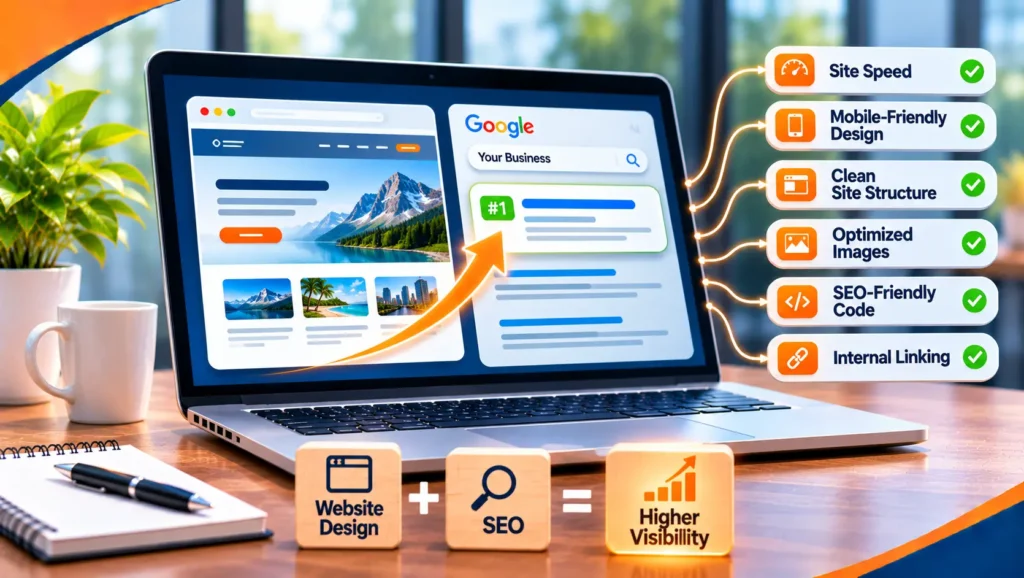
Website design and SEO are not separate jobs. Almost every design choice, from how pages are named to how a menu works on a phone, affects whether search engines can find your pages, understand them and show them to the right people. A site that looks good but is built without search in mind can be hard to rank, and a site built only for search can be hard to use.
This guide explains how design and SEO fit together, which choices matter most, what to ask your designer or developer for and which mistakes to avoid. It uses Google’s own documentation and does not quote benchmarks or costs, because they vary too much between sites to be useful.
Good design for SEO means readable web addresses, the same content on mobile and desktop, fast pages, links that search engines can follow, clear headings and text that is not hidden behind scripts. Google’s page on mobile-first indexing says Google uses the mobile version of a site’s content for indexing and ranking, so a site must work well on a phone before anything else. Plan for search at the start of a design project, because fixing it afterwards costs more.
Table of contents
- How design and SEO connect
- Design choices and their SEO effect
- Page structure and URLs
- Mobile design
- Speed
- JavaScript and modern frameworks
- Layout, content and images
- Navigation and internal links
- Accessibility
- Choosing a platform
- Redesigns and site moves
- Questions to ask your designer
- A design brief for SEO
- A worked example
- Common mistakes
- Website design and SEO FAQ
- Where to start
How design and SEO connect
Search engines do three things with a page: they find it, they read it and they decide whether to show it. Design affects all three.
- Finding. Navigation, links, sitemaps and URL structure decide whether crawlers reach every page.
- Reading. Headings, text, images and code decide whether a page can be understood.
- Showing. Speed, mobile layout and clarity decide whether searchers stay once they arrive, which is what your business actually needs.
This is why SEO belongs in the design brief, not in a checklist at the end. Our guide to SEO explains the basics if you are new to the topic.
Design choices and their SEO effect
| Design choice | SEO effect | What to do |
|---|---|---|
| Page names and folders | Affects how clear and stable your URLs are | Use short, readable words and keep them once chosen |
| Mobile layout | Google indexes the mobile version | Make sure it has the same content as desktop |
| Large images and sliders | Can slow pages down | Compress and size images, and limit sliders |
| Menus and buttons | Decide whether pages can be found | Use real links and a clear structure |
| Text in images | Search engines may not read it | Keep important words as text |
| Tabs and accordions | Can hide content from visitors | Allowed for primary content on mobile, but keep it readable |
| JavaScript rendering | Content may appear late or not at all | Test what search engines see |
| Pop-ups | Can cover content and frustrate visitors | Keep them small and easy to close |
Page structure and URLs
How you organize pages is a design decision with long lasting effects. Group related pages together, such as services under a services section, and give each page one clear topic. This helps visitors and search engines understand your site.
Google’s guidance on URL structure gives practical advice.
- Use readable words. Google says to use readable words rather than long ID numbers when possible.
- Separate words with hyphens. Not underscores.
- Keep parameters few. Filters, sorting and session IDs can create huge numbers of URLs, so limit them.
- Do not use fragments for content. Content that changes only after a hash in the address is hard for search engines to treat as separate pages.
Our guides to canonicalization and subdomain SEO explain how to handle duplicates and when to use a subdomain.
Mobile design
Google’s mobile-first indexing guidance recommends responsive design, where one page adapts to every screen. If you do keep a separate mobile version, it says to check these points, and the same care is sensible for any site.
- Same primary content. The mobile page should carry the same main content and headings as desktop. Accordions and tabs are acceptable.
- Same tags. Use the same robots meta tags, titles and descriptions on both.
- Same structured data. Both versions should describe the content in the same way.
- Same images. Keep the same alt text, and do not lazy-load primary content that needs a user action to appear.
Also test the things visitors feel: tap targets, readable text and forms that work with a keyboard on a phone. Our responsive web design service covers this work.
Speed
A slow page loses visitors before they read a word. Google’s guidance on web vitals says pages should have a Largest Contentful Paint of 2.5 seconds or less, an Interaction to Next Paint of 200 milliseconds or less and a Cumulative Layout Shift of 0.1 or less.
- Images. They are the most common cause of slow pages. Resize and compress them, and load only what is needed.
- Scripts. Every plugin, tracker and widget adds weight. Remove the ones you do not use.
- Fonts. Limit the number of fonts and weights.
- Layout shifts. Reserve space for images and ads so the page does not jump while loading.
- Hosting. A slow server limits what design can do.
JavaScript and modern frameworks
Many modern sites are built with JavaScript frameworks. They can work well for search, but only if built with care. Google’s JavaScript SEO basics make several points.
- Google can render JavaScript, in phases. It crawls, renders and indexes. Server-side rendering or pre-rendering is still recommended, because not all bots can run JavaScript.
- Links must be real links. Google only discovers links that are anchor elements with an href attribute.
- Titles and descriptions must be unique. JavaScript can set them, but each page needs its own.
- Status codes matter. A missing page should return a real 404, not a blank page that says 200.
- Content must be visible after rendering. If it is not in the rendered page, it cannot be indexed.
If your site uses a framework, ask your developer how pages are rendered and test a few with Google’s URL Inspection tool.
Layout, content and images
- Headings. Use one main heading and clear subheadings in order. They help readers scan and help search engines understand structure.
- Real text. Keep key information as text, not as part of an image.
- Short paragraphs and lists. They read better on a phone.
- Calls to action. Put a clear next step on every important page.
- Image descriptions. Google’s image guidance calls alt text the most important attribute for adding metadata to an image. Write information-rich text, and use descriptive file names.
- Metadata. Each page needs its own title and description. Our guide to metadata SEO explains how.
Navigation and internal links
A menu is a design element and an SEO tool. Make sure every important page is reachable through links, ideally within a few clicks from the home page. Use clear labels that match how customers speak, and link related pages together in the text. Pages that nothing links to are hard to find, however good they are.
Add an XML sitemap so search engines can see your pages, and a simple HTML footer with your main sections. For a local business, include each location’s page in the navigation. Our local SEO audit guide shows how to check this.
Accessibility
Accessibility and SEO overlap. Descriptive headings, alt text, readable text and clear links help people using assistive tools and search engines alike. The WCAG standard is the reference for accessible design, and it is a good checklist for your designer.
Choosing a platform
The platform you build on sets limits on what design can do for SEO. There is no single best choice, so judge each option on what it lets you control.
- Can you edit titles, descriptions and alt text for every page? If not, the platform holds you back.
- Does it produce clean, readable URLs? And can you set them yourself?
- Is it fast by default? Test a demo site on a phone before you commit.
- Can you add redirects, sitemaps and structured data? You will need all three.
- Can you move away later? Ask how you would export your pages if you left.
Website builders, content management systems and custom builds can all work. Choose the one your team can manage well, and check its SEO controls before you start, not after.
Redesigns and site moves
A redesign is the riskiest moment for SEO. New page names, new templates and a new platform can all change what search engines see. Google’s guidance on site moves with URL changes gives the main points.
- Change one thing at a time. A new design, new URLs and a new domain at once make problems hard to trace.
- Map every old URL to a new one. Include images and files.
- Use permanent redirects. Send each old URL straight to its new address, with no chains, and not all to the home page.
- Keep the redirects. Google advises at least a year.
- Update sitemaps and internal links. Point them at the new addresses.
- Monitor. Check traffic and indexing in Search Console after launch.
Google says rankings and visibility may fluctuate during a move. Plan for it, and do not launch during your busiest season.
Questions to ask your designer
A good designer will welcome these questions. A vague answer is a warning sign.
- How will you plan the page structure and URLs? You want a page map before design starts.
- How do you make sure the mobile version has the same content? They should name a test.
- How will you keep the site fast? Ask about image handling and scripts.
- How are pages rendered? If scripts build the page, ask how search engines see it.
- What happens to my old pages? Ask for the redirect plan.
- Who owns the site and the code? You should.
A design brief for SEO
Give your designer or agency this list before work starts.
| Area | What to ask for |
|---|---|
| Structure | A page map with one topic per page and readable URLs |
| Mobile | Responsive design with the same content on every screen |
| Speed | Compressed images, few scripts and a target for web vitals |
| Rendering | Content and links visible without extra clicks, and tested |
| Metadata | Editable titles, descriptions and image alt text for every page |
| Redirects | A map from old URLs to new ones, if you are replacing a site |
| Tracking | Analytics and goals for calls, forms and bookings |
| Accessibility | Compliance with a named standard, such as WCAG |
A worked example
This is a made up example, used to show the method. It is not a client result, and the numbers are not real.
Imagine a small furniture maker whose new site looks striking but cannot be found.
| Problem found | Cause | Fix |
|---|---|---|
| Product pages are not indexed | Pages load through scripts, and links are not real links | Server-side rendering and proper anchor links |
| Slow on a phone | Huge photos on every page | Resize and compress the images |
| Every page has the same title | A template default | Unique titles and descriptions for each product |
| Old pages were lost | No redirects at launch | Map and redirect every old address |
None of this makes the site less attractive. It makes the site findable.
Common mistakes
- Designing first and thinking about SEO later. It is cheaper to plan it in.
- Hiding content on mobile. Google indexes the mobile version.
- Sliders and heavy effects. They slow pages and rarely help visitors.
- Text in images. Search engines may not read it.
- Launching without redirects. It throws away the visibility the old pages earned.
- Blocking the site during a build and forgetting to unblock it. Check robots and noindex settings after launch.
- Ignoring metadata. Default titles and empty descriptions waste a simple chance.
Website design and SEO FAQ
What is SEO in website design?
It is the practice of building a site so search engines can find, read and understand it, and so visitors can use it easily. It covers structure, URLs, speed, mobile layout, content and metadata.
Is SEO still relevant in 2026?
Yes. People still search, and Google says the best practices for SEO remain relevant for its AI features. A fast, clear, well structured site is the base for any of them.
How much does SEO cost for a website?
It depends on the size of the site, how competitive your market is and how much work is needed, so any single figure would mislead. Building good SEO into a new design is usually cheaper than fixing a finished site. Ask any provider what is included, and what they will not promise.
How do I learn SEO as a beginner?
Start with Google’s free SEO Starter Guide and Search Console, and look at your own site’s data. Our guide to SEO gives a plain overview. Practice on one site is the fastest teacher.
Can I use a website builder and still do SEO?
Often yes. Check that the builder lets you edit titles, descriptions and alt text, produces fast pages and gives you readable URLs. Our guide to the best AI website builders compares some options.
Does design affect rankings directly?
Design affects the things that search engines measure and the things visitors do, such as speed, mobile layout, structure and clarity. It is not a single ranking switch. A site that is easy to crawl, fast and clear gives your content the best chance.
How long does it take to see results after a redesign?
It varies. Google says changes can take from a few hours to several months to show, and that rankings can fluctuate during a move. Monitor Search Console for the first weeks and judge the trend over months.
Should my designer or my SEO provider decide the site structure?
Ideally both, together, before design starts. A designer knows how people use a site, and an SEO provider knows how search engines read one.
Where to start
Open your three most important pages on a phone and ask: does the content match the desktop version, does the page load quickly, and can I reach it through a link from the home page? Fix what fails, then check your titles and descriptions. If you are planning a redesign, write the brief above before any design work begins. That is a solid first month.
If you want a second opinion, Torplix offers a free review of your site, with a written list of fixes in priority order. It is yours to keep whether or not you work with us, and we do not promise rankings. See our website design and development service, our technical SEO service for how we work.