B2B SaaS is business software that companies use over the internet and pay for by subscription. B2B means “business to business”: the customer is another company, not an individual shopper. SaaS means “software as a service”: the vendor runs the software and the customer logs in, instead of installing and maintaining it themselves.
This guide explains what B2B SaaS is, how it works, how it differs from consumer software, the main types and examples, how it is priced and how to choose it. It is written in plain language for buyers, founders and marketers who are new to the term.
B2B SaaS is software sold to businesses and delivered online by subscription. The US standards body NIST defines SaaS as the capability to use the provider’s applications running on a cloud infrastructure. In B2B SaaS, the buyer is a company, several people usually use the product, and the vendor handles hosting, security, updates and support. Examples include customer relationship management, accounting, team messaging and project tracking tools.
Table of contents
- What B2B SaaS means
- How B2B SaaS works
- B2B SaaS vs B2C SaaS
- B2B SaaS examples
- Types of B2B SaaS
- How B2B SaaS is priced
- The numbers SaaS companies watch
- Benefits and drawbacks for the buyer
- Security and compliance basics
- Common B2B SaaS terms
- How to choose a B2B SaaS product
- Common mistakes when buying B2B SaaS
- How B2B SaaS companies sell
- B2B SaaS FAQ
- Where to start
What B2B SaaS means
The term has three parts, and each one matters.
Software
A program that does a job, such as sending invoices, tracking customers or scheduling projects.
As a service
The vendor hosts the software on its own systems and the customer uses it through a web browser or an app. The customer does not buy a copy to install on their own computers. They pay to use it, usually every month or every year, and the vendor keeps it running and up to date.
Business to business
The customer is an organisation. A company chooses the product, pays for it and gives its staff access. That affects how the product is built and sold: it needs accounts for teams, permissions, security controls, reports and integrations with other business tools.
How B2B SaaS works
Most B2B SaaS products follow a similar pattern.
- The company signs up. Someone starts a free trial or books a demo, then the company agrees a plan.
- Accounts are created. The company adds its staff, often with different roles such as admin and user.
- People use the product online. They log in through a browser or an app, and their data is stored in the vendor’s cloud systems.
- The vendor runs everything behind the scenes. That includes hosting, backups, security patches and new features.
- The company pays on a schedule. Payment is monthly or yearly, and often grows as more people or more usage are added.
- The relationship continues. The customer renews, upgrades, downgrades or leaves, and the vendor works to keep them.
Why the subscription matters
Because customers pay again every period, the vendor has to keep earning the renewal. That is why B2B SaaS companies spend so much effort on onboarding, support and product improvements, and why customer retention is a central measure of the business.
B2B SaaS vs B2C SaaS
| B2B SaaS | B2C SaaS | |
|---|---|---|
| Who buys | A company, often after input from several people | An individual |
| Who uses it | Employees, partners or the company’s customers | The buyer |
| Buying process | Longer, with trials, demos, reviews and approvals | Quick, often a sign up and a card |
| Price | Usually higher per account, often per user or per usage | Usually low, often a simple monthly fee |
| Features | Teams, roles, security, reporting and integrations | Ease of use and personal features |
| Support | Onboarding, account managers, service levels | Help pages and self service |
Some products sit between the two. A tool that a freelancer buys alone and a large company buys for thousands of staff may be sold both ways. The labels describe who the main buyer is, not a strict rule.
B2B SaaS examples
These are well known products that businesses use over the internet. Each is described in one line, to show the range, and the list is not a ranking or a recommendation.
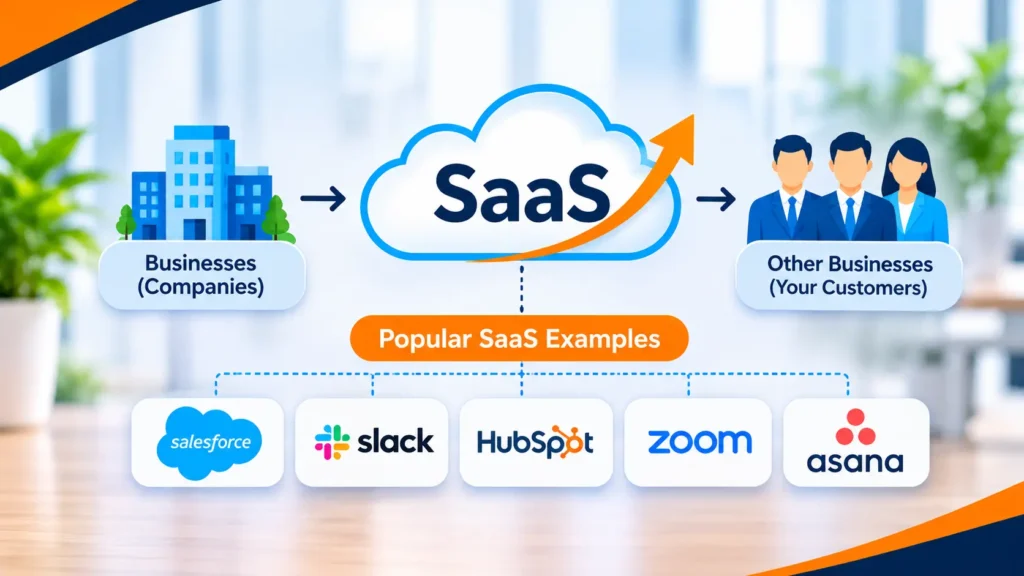
- Salesforce. Customer relationship management software for sales, service and marketing teams.
- Slack. Team messaging and collaboration.
- HubSpot. Software for marketing, sales and customer service.
- Zoom. Video meetings and communication.
- Jira. Issue and project tracking, widely used by software teams.
- QuickBooks Online. Accounting software for small and mid sized businesses.
- Workday. Human resources and finance software for larger organisations.
- Shopify. A platform businesses use to build and run online stores.
Many of these also have free or low cost plans for individuals, which is one reason the B2B and B2C labels blur.
Types of B2B SaaS
There are several ways to group B2B SaaS. Two are especially useful.
Horizontal and vertical
- Horizontal SaaS serves many industries with a common need, such as accounting, email or project management.
- Vertical SaaS serves one industry deeply, such as software for dental practices, construction firms or law firms.
By function
| Function | What it does | Typical users |
|---|---|---|
| Customer relationship management | Tracks leads, customers and deals | Sales and service teams |
| Marketing | Email, forms, analytics and campaigns | Marketing teams |
| Finance and accounting | Invoices, payments, expenses and reports | Finance teams and owners |
| Human resources | Hiring, payroll and staff records | HR teams |
| Collaboration | Messaging, documents and meetings | Whole organisations |
| Project management | Plans, tasks and deadlines | Project and product teams |
| Security and identity | Logins, access control and monitoring | IT and security teams |
| Developer tools | Hosting, testing, monitoring and code tools | Software engineers |
How B2B SaaS is priced
Pricing models differ, and the model often shapes how the company grows and how a buyer budgets.
- Per seat. A fee for each user. Simple to understand, and it grows with the team.
- Tiered plans. Fixed packages, such as basic, pro and enterprise, with more features at each level.
- Usage based. Pay for what you use, such as messages sent, records stored or calls made.
- Flat fee. One price for the whole company, regardless of the number of users.
- Freemium. A free plan with limits, and paid plans for more features or capacity.
- Custom quotes. For larger organisations, the price is agreed after a conversation about needs.
What to watch as a buyer
Check what happens when you add users or exceed a limit, whether discounts depend on paying yearly, and what it costs to leave. A low starting price can rise quickly with growth.
The numbers SaaS companies watch
You will see a few terms often when you read about B2B SaaS businesses. Here are the common ones in plain words.
- MRR and ARR. Monthly and annual recurring revenue: the predictable subscription income.
- Churn. The share of customers or revenue lost over a period.
- Net revenue retention. Whether existing customers pay more or less over time, after upgrades and cancellations.
- CAC. Customer acquisition cost: what it costs to win a customer.
- LTV. Lifetime value: what a customer is likely to pay over the relationship.
- Activation. The share of new sign ups who reach a first useful result in the product.
Buyers do not need these numbers, but they explain why vendors care so much about onboarding and renewals.
Benefits and drawbacks for the buyer
Benefits
- Quick to start. No servers to buy or software to install.
- Updates included. New features and fixes arrive without a project.
- Predictable cost. A subscription is easier to plan than a large upfront licence.
- Access from anywhere. Staff can use it from different places and devices.
- Easier to scale. Add or remove users as the team changes.
Drawbacks
- Ongoing cost. You pay every period, and the total can exceed an old style licence over time.
- Less control. The vendor decides when features change or are removed.
- Dependence on the vendor. If the service goes down or the company closes, you are affected.
- Data in someone else’s systems. You need to trust the vendor’s security and check where data is stored.
- Switching can be hard. Moving data and retraining staff takes effort.
Security and compliance basics
When a vendor hosts your data, its security becomes part of your risk. You do not need to be an expert to ask good questions.
- Where is data stored? Ask which country or region, and whether you can choose.
- Who can see it? Ask how the vendor controls staff access to customer data.
- How is it protected? Ask about encryption, backups and how incidents are handled.
- What evidence exists? Common independent reports and standards include SOC 2 and ISO 27001. Ask for the report or certificate and check what it covers and when it was issued.
- What about privacy law? If you handle personal data, ask how the vendor supports rules such as GDPR in Europe or similar laws elsewhere.
- Can you leave with your data? Check that you can export it in a usable format.
A logo on a web page is not proof. For anything involving sensitive data, involve your IT and legal people before you sign.
Common B2B SaaS terms
These words come up in demos and contracts. Here is what they mean.
- Onboarding. The process of getting a new customer set up and using the product.
- Integration. A connection between the product and another tool, such as your accounting or email software.
- API. A way for other software to talk to the product, so data can move automatically.
- SSO. Single sign on: staff use their company login instead of a separate password.
- Multi-tenant. Many customers share the same underlying system, kept separate by the vendor.
- SLA. A service level agreement: the vendor’s promise about uptime and support response.
- Sandbox. A test area where you can try the product without touching real data.
- Seat. One user licence.
How to choose a B2B SaaS product
- Define the job. Write down the problem, who will use the product and what a good result looks like.
- List must haves. Separate the features you need from the ones that are nice to have.
- Check integrations. Make sure it connects to the tools you already use.
- Ask about security and data. Where data is stored, how it is protected, how access is controlled and whether you can export it.
- Try before you commit. Use a trial with real tasks and real colleagues.
- Read the contract. Look at term length, renewal terms, price changes, limits and how to cancel.
- Check support and reliability. Ask about response times, onboarding help and service status history.
- Talk to existing customers. Ask how long it took to get value and what they would change.
Ask vendors for evidence of any security certifications they claim, rather than relying on a logo on a web page. If a purchase is large or involves sensitive data, involve your IT and legal teams.
Common mistakes when buying B2B SaaS
- Buying on features alone. A long feature list does not help if your team will not use the product.
- Skipping the trial. You learn more from a week of real use than from a demo.
- Ignoring the exit. Check how to cancel and how to get your data out before you need to.
- Forgetting the full cost. Add setup, training, extra users and integrations to the subscription price.
- Letting each team buy its own. Overlapping tools waste money and scatter data.
- Not naming an owner. Someone inside the company needs to own the product after the sale.
How B2B SaaS companies sell
If you work at a software company, the questions are different. Most B2B SaaS companies use one of three approaches.
- Sales led. Prospects talk to a salesperson, see a demo and sign a contract. Common for higher priced products.
- Product led. People try the product themselves, often on a free plan, and upgrade when they see value.
- Hybrid. Self service for small accounts and a sales team for larger ones.
Marketing for B2B SaaS has to explain a product that is hard to see, to buyers who compare carefully, and search is one of the main routes, as our guide to SaaS SEO explains. Our SaaS marketing guide covers the channels, our post on SaaS content marketing shows how to plan content around buyer questions, and our B2B digital marketing guide covers longer sales cycles. If you are weighing outside help, see how to choose a SaaS marketing agency.
B2B SaaS FAQ
What is a B2B SaaS example?
Salesforce is a common example. It is customer relationship management software that companies pay to use online. Others include Slack for team messaging, QuickBooks Online for accounting and Jira for project tracking.
Is Netflix a B2C SaaS?
Netflix is a subscription service sold to individuals, so it is business to consumer. Whether to call it SaaS depends on your definition. SaaS usually means software applications that a customer uses to do a task, while Netflix mainly delivers a content library, so it is more often called a streaming service.
Is Netflix SaaS?
Most people would not use that label for it, because the product is entertainment content, not a software tool for getting work done. Both are delivered over the internet by subscription, which is why the question comes up.
Is Apple a B2B or B2C company?
Apple is best known for consumer products, so it is mostly described as B2C. It also sells to businesses and schools, so it does not fit one label perfectly. B2B and B2C describe who the main customer is for a given product or sale.
What is the difference between SaaS and B2B SaaS?
SaaS describes how software is delivered: hosted online by the vendor and paid for by subscription. B2B SaaS is SaaS sold to businesses. B2C SaaS is sold to individual consumers.
Is SaaS the same as cloud software?
SaaS is one kind of cloud service. Other kinds provide computing power or platforms for developers to build on. With SaaS, the customer simply uses a finished application.
How do B2B SaaS companies make money?
Mainly through recurring subscriptions. Some also charge for setup, training, extra usage or premium support.
Where to start
If you are buying, write down the one job you need done and the three tools you are already using, then compare two or three products against that list with a real trial. If you are building or marketing a B2B SaaS product, start by writing in plain words who it is for and what problem it solves.
If you want a second opinion on how your software site speaks to buyers, Torplix offers a free audit of your site, with a written list of fixes in priority order. It is yours to keep whether or not you work with us, and we do not promise rankings or sign ups. See our B2B SEO services for how we work.