
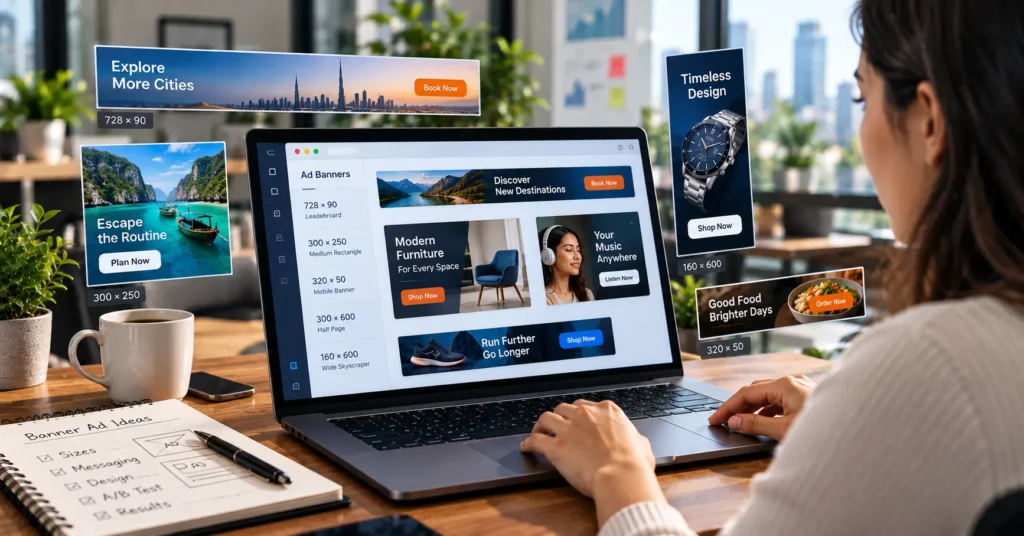
Banner ads are rectangular adverts, usually an image with a short message and a button, that appear on websites, apps and social feeds. They are also called display ads. Their job is to get your brand seen and to send people to a page where they can take the next step.
This guide explains how banner ads work, the main types and sizes, what they cost, whether they still work, how to design one and how to make your first. It uses Google’s own help pages for sizes and design advice.
A banner ad is a graphic advert shown on a website or app, linked to a page of your choice. You pay by views, clicks or actions, depending on how you buy. They suit building awareness and reminding people who have already visited your site. Click rates on banner ads are usually modest, so judge them by the goal you set, and test several versions. Google recommends testing three to four ads per ad group, with a clear image, a clear headline and a relevant landing page.
Table of contents
What banner ads are
A banner ad is a graphic advert placed on a web page or in an app. It usually has a short headline, an image or logo and a button, and it links to a page on the advertiser’s site. The name comes from the way the first ones stretched across the top of a page like a banner.
Today the term covers many shapes. A wide strip across the top of a page is often called a leaderboard. A tall strip down the side is called a skyscraper. A box inside the text of an article is called an inline rectangle. People also use “banner ads” and “display ads” to mean much the same thing, which is why this guide uses both.
Banner ads are different from search ads. A search ad appears when someone types a question and matches the words they used. A banner ad appears while someone is doing something else, such as reading an article, so it has to earn attention in a second or two.
How banner ads work
An advertiser makes the ad and chooses who should see it. A platform, such as an ad network or ad exchange, matches the ad with space on websites and apps that sell it. When a person loads a page, the platform decides which ad to show them, often in a fraction of a second. Most of this runs automatically.
How you choose who sees the ad
- Placement and topic. You can show the ad on pages about a certain subject, or on specific sites.
- Audience. You can aim at groups of people by interest, location or other traits, depending on the platform.
- Retargeting. You can show the ad to people who already visited your site, to remind them to come back.
How you pay
- Cost per impression. You pay each time the ad is shown, usually quoted per thousand views.
- Cost per click. You pay when someone clicks the ad.
- Cost per action. You pay when someone completes a step, such as a purchase or a form.
The right model depends on your goal. If you want awareness, paying per view may fit. If you want visits, paying per click is common. Our guide to pay per click explains the bidding side in more detail.
Types of banner ads
| Type | What it is | Best for |
|---|---|---|
| Static banner | A single image with text and a button | Simple messages and offers |
| Animated banner | A short loop of frames, often a GIF or HTML5 file | Showing steps or two ideas in one space |
| Responsive display ad | You upload images, headlines and a logo, and the platform builds ads in sizes that fit each space | Reaching many placements with less design work |
| Retargeting banner | An ad shown to people who visited your site | Reminding visitors, recovering abandoned carts |
| Rich media or expandable | An ad that expands or plays when someone interacts | Brand campaigns with larger budgets |
| Mobile app banner | A small strip placed within an app screen | Reaching people while they use apps |
Banner ad sizes
Sizes are measured in pixels, width by height. Some sizes are used far more than others because many sites offer space for them. Google’s AdMob help lists these supported image ad sizes.
| Size | Common name | Where it fits |
|---|---|---|
| 728 x 90 | Leaderboard | Across the top of a page on a computer |
| 300 x 250 | Inline rectangle | Inside content, on computers and phones |
| 320 x 50 | Mobile leaderboard | A thin strip on a phone |
| 320 x 100 | Large mobile banner | A taller strip on a phone |
| 468 x 60 | Banner | A smaller strip on older layouts |
| 250 x 250 | Square | Small spaces in content or sidebars |
These come from AdMob’s image ads help page, which also sets a file size limit of 150 KB and allows JPG, PNG and GIF files for those ads. Check the current limits of whichever platform you use before you design.
If you use responsive display ads in Google Ads, you upload images and text and Google builds the sizes for you. Its best practices guide recommends a landscape image of 1200 x 628, a square image of 1200 x 1200 and a portrait image of 900 x 1600, with smaller minimums. It also advises not to put text over an image, because overlaid text can be unreadable in smaller ad sizes.
How much banner ads cost
There is no standard price. What you pay depends on the platform, the audience you choose, where the ad appears, how many people want the same space and how you buy.
The arithmetic is simple. Here are two made up examples to show how the models work. They are not real prices.
| Model | Example (made up) | What you would pay |
|---|---|---|
| Per thousand views | $5 per 1,000 views, 100,000 views | $500 |
| Per click | $0.50 per click, 800 clicks | $400 |
| Per action | $10 per sale, 30 sales | $300 |
In most platforms you set a daily budget so spending stays under control. Start small, learn what works, and increase only when results justify it. Remember that the cost of the ad itself is not the whole cost. Design time, tools and the work of measuring results also count.
If you want help managing paid ads, see our PPC services. We price after a free audit and confirm the cost in writing.
Do banner ads still work?
They can, depending on the goal. Banner ads have strengths and limits, and being honest about both helps you decide.
Where they help
- Awareness. They put your name and offer in front of people who have not heard of you.
- Retargeting. They remind people who visited your site and left, which can bring some back.
- Support for other channels. They keep a campaign visible while search, email and social do the closing.
Where they struggle
- Attention. Many people scroll past ads without looking, a habit often called banner blindness.
- Low click rates. A small share of people click, so judging only by clicks can mislead.
- Blocked ads. Some people use tools that hide ads.
- Weak targeting if left loose. An ad shown to the wrong audience wastes money.
A fair way to judge banner ads is to set a clear goal first, such as visits, sign ups or sales from retargeting, and measure that goal. Do not expect them to work like search ads, where the person is already looking for you.
What makes a good banner ad
You have only a moment, so a good banner ad is simple. Google’s Ads help page on effective display ads gives clear advice, and we have added our own.
- A clear, high quality image. Google says your main image should be clear and high quality.
- A clear headline. Google advises avoiding generic messaging, all caps and click bait. Say what you offer in a few words.
- One message. One idea per ad is easier to understand than three.
- A visible offer when you have one. Google notes that terms such as special offers, discounts and promo codes signal a deal.
- A clear call to action. A button with plain words such as “Get a quote” or “Shop now” tells people what to do.
- A relevant landing page. Google says to include a clear call to action that takes people straight to a relevant page.
- Your name or logo. People should know who the ad is from.
- Readable text. Use high contrast and large enough type for the smallest size.
Google also suggests creating three to four ads per ad group to test different messages with different images. Test one change at a time so you know what made the difference.
How to make a banner ad: 7 steps
1. Set one goal
Decide what the ad should achieve, such as visits to a page, sign ups or sales. Everything else follows from the goal.
2. Choose the audience
Decide who should see it, using the options the platform gives, and keep it narrow enough to be relevant.
3. Pick the sizes or use responsive ads
Choose the sizes from the table above, or upload assets for responsive ads and let the platform build the sizes.
4. Write the message
Write a short headline, a line of support and a clear button label. Read it aloud. If it takes more than a few seconds, cut it.
5. Design the ad
Use your brand colours and logo, a clear image and plenty of space. A simple layout beats a crowded one.
6. Set up the landing page and tracking
Send people to a page that matches the ad and makes the next step easy. Set up tracking so you can see visits and actions.
7. Launch, test and improve
Run several versions, check the results after a sensible period and keep the best. Replace the weakest and try again.
Banner ad examples
These examples are made up. They show copy ideas, not real campaigns or results. Use them to see how the advice above looks in words.
| Business (made up) | Goal | Headline | Button | Why it works |
|---|---|---|---|---|
| Local dental practice | New patient bookings | “New patients welcome this month” | Book a visit | One clear offer, aimed at people nearby |
| Online shoe store | Bring back visitors | “Still thinking about these?” | Back to your basket | Retargeting, personal and specific |
| Accounting software | Free trial sign ups | “Close your books in half the time” | Start free trial | States a benefit and the next step |
| Cafe | Footfall | “Fresh bread from 7 am, round the corner” | Get directions | Local, simple, easy to act on |
| Training course | Enquiries | “Learn spreadsheets in a weekend” | See the course | A clear promise for a clear audience |
Banner ads vs display ads vs social ads
The names overlap, which can be confusing.
| Banner ads | Display ads | Social ads | |
|---|---|---|---|
| What they are | Graphic adverts, often fixed sizes | The wider group of image and text ads on sites and apps | Adverts that appear in social media feeds and stories |
| Where they appear | Websites and apps | Websites, apps and video | Inside a social platform |
| How you buy | Ad networks and exchanges, or directly from a site | Ad networks and exchanges | The social platform’s own tool |
| Targeting | Placement, audience, retargeting | Placement, audience, retargeting | The platform’s audience data |
In daily use, “banner ads” and “display ads” are often used for the same thing. For social ads, see our post on what to look for in a Facebook ads agency.
Common banner ad mistakes
- Too much on one ad. Several messages, a long headline and small text lose the reader.
- A vague call to action. “Click here” tells people nothing.
- A mismatched landing page. If the page does not match the ad, people leave.
- No testing. One version leaves you guessing about what works.
- Judging by clicks alone. Look at the goal, such as sign ups or sales, not only clicks.
- No frequency control. Showing the same ad too often can annoy people.
Banner ads FAQ
What are the best banner ads?
There is no single best banner ad. The best ones are clear, relevant and tested against your own goal. A banner that works for a shoe store may not work for a software company. Judge by your own results, not by a gallery of examples.
Do banner ads work for small businesses?
They can, especially retargeting people who visited your site and local campaigns with a clear offer. Start with a small budget, one goal and a few versions. If the numbers do not justify more spend, stop and try another channel.
Are banner ads the same as pop ups?
No. A banner ad sits within a page, while a pop up appears over the content. Pop ups can be more intrusive, and many browsers and tools block them.
Do I need a designer to make a banner ad?
Not always. Simple tools and responsive display ads let you build ads from your own images, headlines and logo. A designer helps when you want a polished brand look or custom animation.
Where to start
Pick one goal and one audience. Write three short headlines, make two simple designs and send both to a page that matches. Run them for a sensible period, then keep the one that does better and try a new version against it.
If you want a second opinion, Torplix offers a free audit of your ad account and site, with a written list of fixes in priority order. It is yours to keep whether or not you work with us, and we do not promise results. See our PPC services for how we work.